
Video doorbells provide a variety of recording settings, but not all models record continually. Some devices record every second, while others only record when activated by motion or user commands. The kind of recording is determined by the device's architecture, power supply, and user preferences. Buyers frequently think that their doorbell camera catches everything, but default settings and subscriptions have a significant influence. Understanding when and how recording occurs enables homeowners to select the best model for their requirements. This book delves into the most popular recording methods, triggers, and privacy concerns to help you manage expectations and make better device selections.
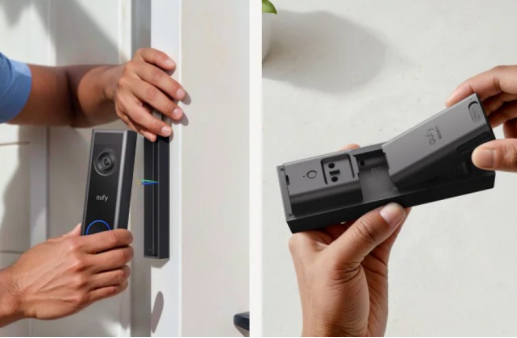
Do Video Doorbells Offer Continuous Recording?
Always-On Recording vs Motion-Activated Recording
Always-on recording implies that the camera stores footage continuously, resulting in a complete video history. It needs additional power, storage, and frequently a paid membership. In contrast, motion-activated recording only stores videos when the camera detects movement. To save power and bandwidth, most consumer video doorbells are set to record only when motion is detected. Continuous recording is usually only supported on high-end models or connected devices. While motion-activated clips are effective for everyday monitoring, continuous recording provides complete context and peace of mind during events. When deciding between these two approaches, users must consider convenience, cost, and the amount of film they need to watch.

How Power Source Limits Recording Behavior
The power source directly impacts how much a video doorbell can record. Motion-triggered clips are commonly used in battery-operated variants to conserve electricity. Batteries are rapidly depleted by continuous recording, rendering them unfeasible without frequent recharge. Longer recording sessions or round-the-clock footage are supported by wired devices that are connected to a steady power source. Even on powered devices, brands frequently turn off continuous recording by default in order to save data. Users should verify if the optional updates are supported by their device. More sophisticated capabilities can be accessed by selecting a wired arrangement, but careful installation and suitable wiring are needed. The degree of freedom the doorbell camera provides in day-to-day use ultimately depends on power availability.
What Triggers Video Doorbell Recording Events?
Motion Sensors, Detection Zones, and Sensitivity
The majority of recorded events on doorbell cameras are triggered by motion sensors. Infrared or pixel-change sensors detect movement and begin a video clip automatically. Detection zones allow users to choose where the camera should concentrate, such as pathways or porches. Sensitivity settings assist in reducing false alerts caused by automobiles, dogs, or passing shadows. Proper calibration minimizes irrelevant recordings and increases battery life. Advanced versions have fine-tuned controls, allowing users to tailor settings to their surroundings. When detection zones and sensitivity are appropriately configured, consumers receive timely notifications and relevant footage. Poor setup causes many false alarms or missing activity, decreasing the camera's usefulness in daily monitoring.
AI-Based Triggers for People and Activity
Modern doorbell cameras utilize artificial intelligence to increase trigger accuracy. Instead of reacting to any movement, AI recognizes humans, animals, parcels, and cars. This lowers false warnings and ensures that recordings include significant occurrences. Some systems can even distinguish familiar faces and movements. AI triggers provide smarter recording and tailored alerts, allowing users to stay updated without continually refreshing the stream. These features frequently need cloud processing and may necessitate a subscription. When configured correctly, AI filtering enhances both the quality of warnings and the relevancy of saved clips, making the system appear more intelligent and less reactive.
Doorbell Presses, Live View, and Manual Recording
A doorbell press is one of the most obvious triggers for recording. When someone rings the doorbell, the camera begins recording automatically. Many devices additionally have a live view mode, which allows users to directly access the camera stream at any time. During live watching, users can begin manual recording to save footage even when no motion is detected. These capabilities provide homeowners with additional control, particularly in unexpected situations or when motion sensors do not activate. Manual recording and live view necessitate a solid app connection and reliable WiFi. These technologies increase the doorbell camera's versatility beyond automation, making it ideal for both passive and active surveillance.
How Do Storage, Privacy, and Settings Control Recording?
Continuous Footage vs Event Clips Storage
Storage strategies influence what is preserved and how long it remains available. Continuous recording generates massive amounts of data, necessitating cloud subscriptions or large-capacity local storage. Event-based recording preserves brief clips triggered by motion or human activity, using less storage. Most users prefer event clips because they are more controllable and cost-effective. Some devices save clips locally on SD cards or network storage, while others use cloud services. Storage plans frequently limit video history and clip duration. The decision between full-time and event-based storage is dependent on security objectives, price, and whether watching hours of tape or only important moments meets user demands.
User Settings to Manage Recording Frequency
User options determine when and how frequently the doorbell camera captures. Motion sensitivity, detection zones, video duration, and cooling times between recordings may all be adjusted using the mobile app. These options assist in balancing battery life, storage usage, and alarm frequency. Some systems allow you to set recording limits during calm hours or high traffic times. Fine-tuning these variables ensures that the camera catches essential events without bombarding users with unnecessary warnings or clips. Regularly evaluating and modifying these parameters maintains the system in sync with seasonal changes, foot traffic, and lifestyle changes, which improves device dependability and overall user happiness.
Privacy Implications of Always-Recording Devices
Always-recording doorbell cameras present privacy issues. Continuous footage may catch neighbors, pedestrians, or public locations, raising legal or ethical concerns. Users must adhere to local audio and video recording rules. Certain sites require permission or appropriate notice. Storing vast amounts of personal footage also raises data security concerns. Cloud-based solutions must be encrypted and give users a choice over retention. Privacy zones can prevent some sections of the frame from being captured. Responsible use involves alerting visitors and monitoring settings on a regular basis. Always-on gadgets should strike a balance between safety and respect for others, preventing misuse while ensuring transparency and security for the homeowner.
Conclusion
Not all video doorbells record continuously. Most models employ motion-based triggers, and only a few wired devices provide full-time recording. A doorbell camera's recording capabilities are influenced by its power supply, storage choices, and user preferences. AI, app settings, and manual controls enable versatility, while privacy settings safeguard home and community borders. Understanding these aspects enables users to strike the correct balance between performance, control, and ethical use. Before assuming a gadget captures everything, look at its specifications, power configuration, and storage plan. A smart configuration ensures that the video doorbell provides security, convenience, and peace of mind without depleting resources or generating worries.















03 Comments
Karon Balina
19th May 2022 ReplyLorem ipsum dolor sit amet, consectetur adipisicing elit, sed do eiusmod tempor incididunt ut labore et dolore magna aliqua. Ut enim ad minim veniam, quis nostrud exercitation ullamco laboris nisi ut aliquip ex ea commodo consequat.
Julias Roy
19th May 2022 ReplyLorem ipsum dolor sit amet, consectetur adipisicing elit, sed do eiusmod tempor incididunt ut labore et dolore magna aliqua. Ut enim ad minim veniam, quis nostrud exercitation ullamco laboris nisi ut aliquip.
Arista Williamson
19th May 2022 ReplyLorem ipsum dolor sit amet, consectetur adipisicing elit, sed do eiusmod tempor incididunt ut labore et dolore magna aliqua. Ut enim ad minim veniam, quis nostrud exercitation ullamco laboris nisi ut aliquip ex ea commodo consequat.