
Mounting a solar-powered security camera is only the beginning of the installation process. To guarantee steady power, a strong signal, and quality footage, users must consider location, angle, connection, and environmental factors. With the proper preparation, installation is rapid, safe, and effective. Poor setup might cause camera downtime, charging troubles, and restricted coverage. Whether you're installing your first unit or extending an existing system, taking systematic steps helps you avoid frequent pitfalls. This article explains how to plan for installation, carry it out correctly, and avoid mistakes that impair performance, giving your solar security camera the best chance of long-term dependability.
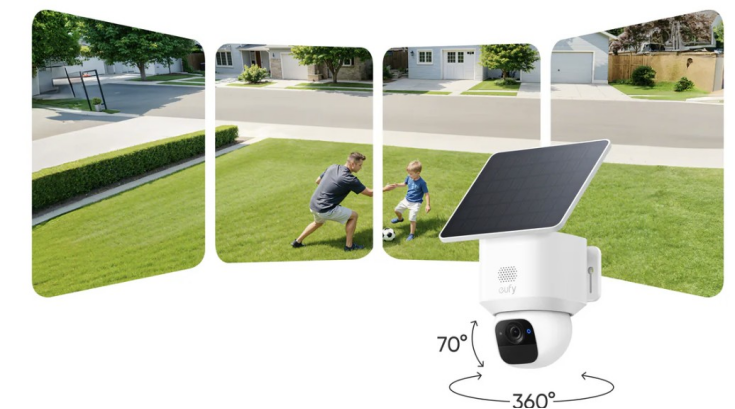
How Do You Prepare for Solar Security Camera Installation?
Choosing the Best Location for Maximum Sunlight
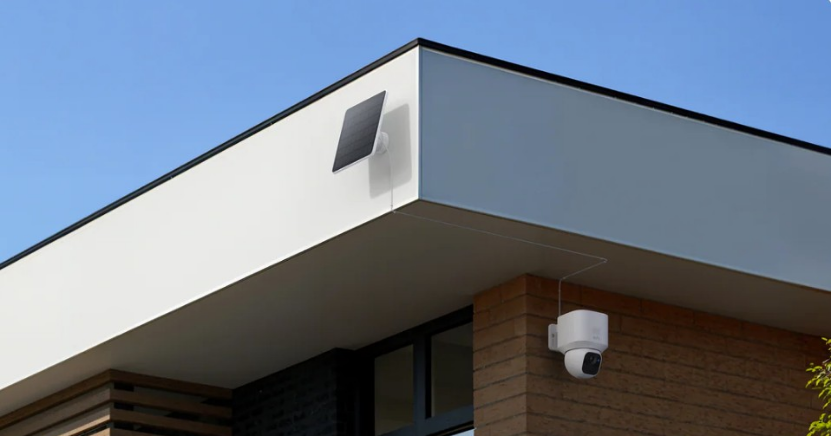
For a solar security camera to be charged, it requires constant exposure to sunshine. Select a spot that gets direct sunlight for the majority of the day; if you're in the northern hemisphere, it should be south-facing. Avoid positioning the solar panel in areas with shadows during the hottest part of the day, such as beneath trees or eaves. As long as sunlight isn't obstructed, elevated locations function effectively. If your camera has a separate solar panel, place it away from the camera body where exposure is optimal. The installation site should always be directed by the amount of sunshine available because a bad charging position leads to low battery levels and unpredictable performance.
Checking WiFi Signal Strength and Connectivity
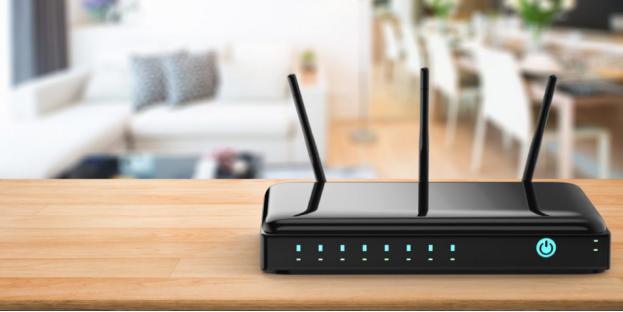
A reliable WiFi connection is required for live streaming, motion warnings, and cloud backups. Before you install your solar security camera, use your phone to test the signal strength at the chosen position. If the signal is poor, try relocating the camera closer to the network or using a WiFi extender. Many apps have built-in signal strength indicators during setup. Avoid putting the camera on metal siding or behind thick walls, since they might disrupt communication. 4G-enabled smartphones provide an option in locations lacking WiFi, but they require a data contract. A reliable signal enables real-time access and smooth performance from your solar camera.
Tools, Mounting Hardware, and Safety Precautions
Before you begin, gather the equipment you'll need: a drill, level, screwdriver, anchors, and mounting screws, which are normally included in the packaging. If you're mounting high, use a ladder and protective gear like gloves and safety glasses. Always switch off the camera during installation. Read the handbook to understand the installation directions and angles. If your model has a separate solar panel, use the included extension cord to neatly fasten it. To avoid damaging surfaces, precisely mark the drill spots. Ensure that any exterior wiring is waterproof. Following basic safety procedures helps to avoid harm and keeps the camera and solar panel firmly in place.
Step-by-Step Guide to Installing a Solar-Powered Security Camera
Mounting the Camera and Solar Panel Correctly
Begin by marking and drilling holes for the camera mounting bracket. Use wall anchors for brick or stucco, and make sure the bracket is level. Attach the solar security camera to the bracket and secure all screws. If utilizing a separate solar panel, position it above or beside the camera, directed toward direct sunlight. Using weatherproof cable clamps or coverings will secure all cords and prevent loose connections. Avoid overtightening, which can cause cracks in mounts or housings. Before completing, use the app to validate the field of view. Proper placement assures camera stability, good coverage, and efficient solar charging all day.
Adjusting Angles for Coverage and Solar Efficiency
Once the camera is mounted, set the lens to cover important areas such as entryways, driveways, and sidewalks. Use the app's live view tool to fine-tune the angle and coverage. Position the solar panel to maximum sun exposure, ideally at a 30-45 degree slant, depending on your region. Check that there are no obstructions from branches or surrounding structures. If your camera and panel are as one unit, strike a balance between view and solar exposure. Re-check the app to ensure a steady view and charge state. Optimal alignment boosts camera performance and battery charging speed, particularly in locations with partial sunshine.
Connecting the Camera to the App and Network
Download the manufacturer's app on your smartphone and set up an account if necessary. Turn on your solar security camera and follow the in-app setup instructions. Most programs will walk you through scanning a QR code on the device, choosing a WiFi network, and connecting the camera. Once connected, try the live view, motion detection, and notification options. Update the firmware if requested. Customize alarm zones and recording choices using the app. A successful connection enables remote monitoring and storage access. If the signal drops or the pairing fails, try moving closer to your network or checking compatibility. Always try all of the features before completing the installation.
Common Installation Mistakes and How to Avoid Them
Poor Sun Exposure and Shaded Panel Placement
Installing the solar panel in a shady spot is among the most frequent problems. The battery won't fully charge in the absence of sufficient sunshine, which might result in short recording durations or camera shutdowns. During the day, avoid positioning the camera or panel beneath trees, rooftops, or locations that are obstructed by buildings. Before deciding on a site, study the area at various times of the year as sun patterns change. Consider a model with a detachable solar panel and place it independently for improved sun access if shadows cannot be avoided. Ensuring consistent solar exposure is key to maintaining uninterrupted power for your solar security camera year-round.
Incorrect Camera Height and Field of View
Mounting a camera too high or too low might reduce visibility and degrade video quality. For best results, mount the solar security camera at a height of 6.5 to 8 feet. This captures accurate face information while keeping the gadget out of reach. To completely cover doors or driveways, tilt the lens slightly lower. Test angles using the app to identify blind spots. Avoid aiming your camera straight toward the sun, since this might distort photographs. Proper height and location guarantee accurate motion detection and complete scene coverage, which improves security and reduces false alerts caused by distant or irrelevant activity.
Ignoring Weather Protection and Maintenance Needs
Even though solar security cameras are designed for outside usage, they require suitable weather protection. Make sure the model has at least an IP65 rating to protect against dust and water. Avoid installing where water can pool or where snow accumulates. To protect against wind damage, use watertight connection seals and secure all cables. Clean the solar panel on a regular basis to eliminate any dust or debris that may be blocking sunlight. Ignoring these precautions might result in power outages, water damage, or poor recording quality. Basic maintenance and careful positioning increase the camera's life and assure consistent, dependable operation in all seasons.
Conclusion
Installing a solar-powered security camera correctly assures continuous coverage, excellent battery performance, and long-term dependability. Begin with wise preparation—select a sunny spot, verify WiFi strength, and assemble your supplies. During installation, consider mounting stability, viewing angle, and solar panel orientation. After setting up, connect to the app, configure alerts, and thoroughly test the system. Avoid typical blunders such as shaded panels, improper camera positioning, and weather neglect. A cautious approach ensures that the camera operates properly and delivers real-time protection without relying on electrical cables. With correct planning and installation, your solar security system will provide you with peace of mind all year long.












03 Comments
Karon Balina
19th May 2022 ReplyLorem ipsum dolor sit amet, consectetur adipisicing elit, sed do eiusmod tempor incididunt ut labore et dolore magna aliqua. Ut enim ad minim veniam, quis nostrud exercitation ullamco laboris nisi ut aliquip ex ea commodo consequat.
Julias Roy
19th May 2022 ReplyLorem ipsum dolor sit amet, consectetur adipisicing elit, sed do eiusmod tempor incididunt ut labore et dolore magna aliqua. Ut enim ad minim veniam, quis nostrud exercitation ullamco laboris nisi ut aliquip.
Arista Williamson
19th May 2022 ReplyLorem ipsum dolor sit amet, consectetur adipisicing elit, sed do eiusmod tempor incididunt ut labore et dolore magna aliqua. Ut enim ad minim veniam, quis nostrud exercitation ullamco laboris nisi ut aliquip ex ea commodo consequat.